
How to Charge a Foger Vape: Full Guide, Charge Times & Tips
Whether you're running a Switch Pro dock or a Bit 35K disposable, here's exactly how to charge it safely, how long it actually takes, and what to do when the battery won't hold a charge.
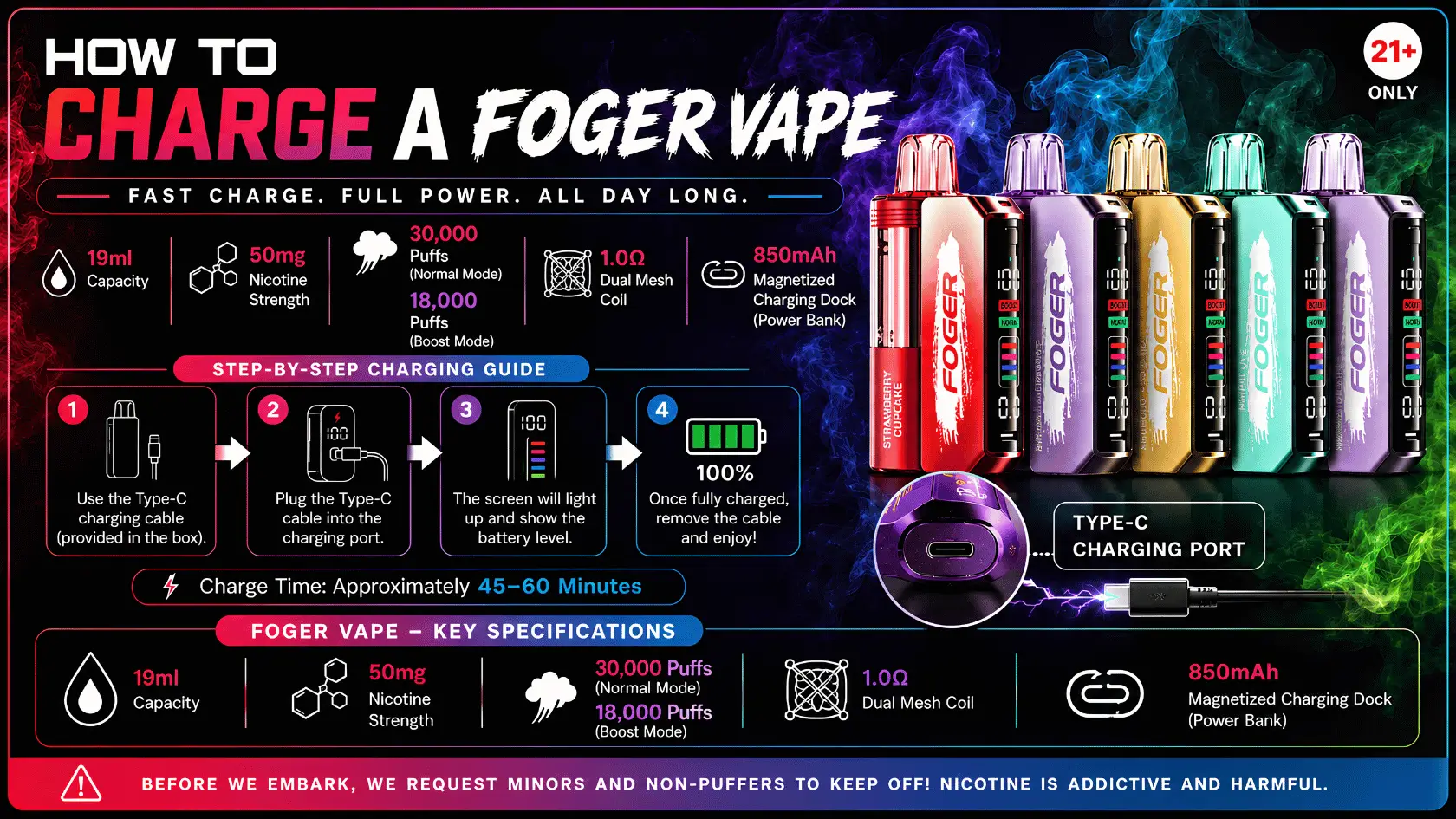
Short answer: both Foger devices charge over USB-C. The Switch Pro uses its magnetic smart charging dock and takes about 45 minutes for a full charge, while the Bit 35K plugs in directly through a port on the bottom of the device and takes roughly 45–60 minutes.
That's the quick version. But charging habits actually affect how long your device lasts, how consistent the vapor is, and whether you get the full puff count you paid for — so it's worth doing right instead of just plugging in and forgetting about it.
This guide walks through both charging methods step by step, covers realistic charge times, and answers the questions people usually search after their first Foger runs low.
How to You Charge a Foger Vape?
Charging depends on which device you own. The Switch Pro kit uses a magnetic dock, while the Bit 35K has a built-in USB-C port. Both are plug-and-charge with no special adapter needed.
Charging the Foger Switch Pro (Dock Method)
Set the device body into the smart charging dock so the magnetic contacts line up, then plug the dock into any USB-C power source. The OLED display lights up and shows the battery percentage climbing in real time.
- Seat the device fully — a loose magnetic connection is the most common reason a charge stalls partway through.
- Use a standard 5V USB-C adapter or a laptop/computer port; no fast-charge brick is required.
- Leave it on the dock until the OLED reads 100% rather than pulling it early "just in case."
Charging the Foger Bit 35K (Direct USB-C)
Flip the device over and plug a USB-C cable directly into the port on the bottom. There's no dock involved — the cable connects straight to the disposable body.
- A small LED near the port indicates charging status on most units — solid usually means charging, off means full.
- Charge it on a flat, cool surface rather than under a pillow or blanket where heat can build up.
- Since the Bit 35K is disposable once the e-liquid runs out, only recharge it while you still have juice left in the tank — there's no reason to keep charging an empty pod.
How Long Does It Take to Charge a Foger Vape?
The Switch Pro's smart dock fully charges the device in approximately 45 minutes. The Bit 35K's built-in battery typically takes 45–60 minutes for a complete charge, depending on how depleted it was to start.
| Device | Charging Method | Typical Full-Charge Time |
|---|---|---|
| Foger Switch Pro Kit | Magnetic USB-C smart dock | ~45 minutes |
| Foger Bit 35K | Direct USB-C (built-in port) | ~45–60 minutes |
Charge times reflect the device specifications listed on thefogerpods.com and are approximate — actual time can vary slightly based on your power source and how low the battery was before you plugged in.
Neither device needs to sit on the charger overnight. Topping off for under an hour is enough for a full cycle, and leaving it plugged in well past 100% doesn't add extra capacity — it just holds the battery at full charge longer than necessary.
How Long Does a Foger Vape Last Once Fully Charged?
A full charge typically gets a Switch Pro through one to two pods before it needs to go back on the dock, and a fully charged Bit 35K is built to outlast its entire e-liquid supply. Actual runtime depends on how often and how long you draw.
The Switch Pro pairs an 850mAh rechargeable battery with a pod rated for up to 30,000 puffs, while the Bit 35K is rated for up to 35,000 puffs on a single charge cycle. For the full breakdown of what affects real-world runtime, see our guide on How Long Does Foger Vape Last.
How Do I Know When My Foger Vape Needs Charging?
The Switch Pro's OLED display shows an exact battery percentage at all times, so there's no guesswork. The Bit 35K relies on an LED indicator near the charging port that typically flashes or changes color when the battery is low.
If vapor production suddenly feels weaker or the draw seems shorter than usual, that's often a battery-level issue rather than a coil or e-liquid problem — plug it in and check before assuming the flavor pod itself is the issue.
Foger Switch Pro 30K vs Bit 35K: Which Charges Faster?
The Switch Pro's dock is slightly faster on paper, at around 45 minutes versus the Bit 35K's 45–60 minute window. In practice, the difference is small enough that it shouldn't be the deciding factor between the two.
The bigger difference is charging style: the Switch Pro's dock manages battery health automatically and pairs with swappable pods, while the Bit 35K is a simpler plug-in-and-go disposable. If you're still deciding which device fits your routine, our full Foger Switch Pro 30K Vs Bit 35K comparison breaks down puff count, coil type, and cost per session.
What's the Right Way to Refill and Recharge a Foger Vape?
For the Switch Pro, refilling and recharging are two separate steps: swap in a new pod when flavor runs out, and dock the device whenever the battery runs low — the two don't have to happen at the same time.
A common mistake is assuming a "dead" device needs a new pod when it actually just needs a charge, or vice versa. Checking the OLED battery percentage first saves you from swapping a perfectly good pod. For step-by-step instructions on swapping pods correctly, see our Foger Vape Refill Guide.
How Do I Use a Foger Vape for the First Time After Charging?
Once your device shows a full charge, using it is straightforward: unbox the pod (Switch Pro) or the device itself (Bit 35K), and draw normally — both are draw-activated with no buttons to press.
First-time users sometimes take overly long pulls expecting a lighter hit, which can feel harsh. Shorter, steady draws give a smoother experience and help the coil last longer. If this is your first Foger device, our guide on How to Use Foger Pods covers airflow settings and draw technique in more detail.
What Nicotine Strength Does the Foger Vape Use?
Both the Switch Pro pods and the Bit 35K use 5% (50mg) nicotine salt e-liquid. That strength is standard across the current Foger lineup and doesn't change based on flavor.
Nicotine salts are absorbed differently than freebase nicotine, which is part of why they can feel smoother at higher strengths. If you're switching from another device or a different strength entirely, our Foger Vape Nicotine Strength guide explains what that adjustment feels like in practice.
Common Charging Mistakes That Shorten Battery Life
Most battery complaints trace back to a handful of avoidable habits rather than a faulty device. Fixing these usually solves the problem without needing a replacement.
- Letting the battery hit zero repeatedly — occasional deep discharges are fine, but doing it every cycle wears down capacity faster over time.
- Charging in direct heat or sunlight — heat is one of the fastest ways to degrade any rechargeable battery, Foger devices included.
- Using a damaged or off-brand cable — inconsistent power delivery can cause slower or incomplete charges.
- Leaving the Switch Pro seated loosely on the dock — a poor magnetic connection can interrupt charging without any obvious warning.
Where Can I Buy a Foger Vape or Find One Near Me?
You can order the full current lineup directly online, or check a local vape shop if you need a device today. Direct ordering guarantees the current flavor selection and listed pricing rather than whatever's left on a shelf.
To browse the full catalog and current pricing, head to Buy Foger Vape Online. If you'd rather pick one up in person, our guide to Foger Vape Near Me covers which local stores typically stock Switch Pro and Bit 35K devices.
Foger Vape Product Specifications
| Spec | Foger Switch Pro 30K | Foger Bit 35K |
|---|---|---|
| Puff Count | Up to 30,000 | Up to 35,000 |
| Nicotine | 5% (50mg) Salt Nic | 5% (50mg) Salt Nic |
| Coil Type | Dual Mesh Coil | Dual Mesh Coil |
| Charging | USB-C Smart Dock (~45 min) | Direct USB-C (~45–60 min) |
| Display | OLED Screen | Curved OLED Display |
| Airflow | Precision Adjustable | Smart Adjustable |
| Design | Modular / Replaceable Pods | Flavor Lock, Fully Disposable |
Foger Vape Flavors List
Both devices come in a wide flavor range. The Switch Pro currently offers 20+ flavors and the Bit 35K offers 50+, spanning fruit, menthol, and dessert profiles.
Fully Charged and Ready to Order?
Shop the full current Foger lineup — verified authentic, fast USA shipping.
Shop Foger Vapes →FAQs
1. How long does it take to fully charge a Foger vape?
The Switch Pro's smart dock takes about 45 minutes for a full charge, while the Bit 35K's built-in USB-C battery typically takes 45–60 minutes depending on how depleted it was beforehand.
2. Can I use any USB-C cable to charge a Foger vape?
Yes. Both devices charge over standard USB-C, so a phone charger, laptop cable, or computer port works fine — no Foger-branded cable is required.
3. Why is my Foger vape not charging?
On the Switch Pro, check that the device is seated fully in the dock — a loose magnetic connection is the most common cause. On the Bit 35K, try a different cable or power source first, since a damaged cable can prevent a full charge.
4. Should I let my Foger vape battery drain completely before charging?
No. Occasional full discharges are fine, but doing it every cycle wears down battery capacity faster over time. It's better to charge when the indicator shows low rather than waiting for it to die.
5. How do I know when my Foger vape is fully charged?
The Switch Pro's OLED display shows an exact battery percentage that reads 100% when done. The Bit 35K's LED indicator near the charging port typically turns off or changes state once the battery is full.
This product contains nicotine, an addictive chemical. Foger vapes are intended for adults 21+. Charge times and specifications reflect current device listings on thefogerpods.com and may vary slightly by unit and power source.